REVIEW · VERONA
Verona: Interactive map for a self-guided tour.
Book on GetYourGuide →Operated by italybyju · Bookable on GetYourGuide
Verona can feel like a lot of walking, but this interactive self-guided map turns it into something you can plan in minutes. You get a ready-made set of stops, plus practical links for tickets and reservations, so you’re not stuck hopping between tabs.
I like two things a lot: the map’s personalized tips and detailed information for more than 50 selected locations, and the fact that it’s built for independence (no group, no meeting point, no guide hovering over you). It also uses partner links with discounts, which can matter on a city break where you’re adding paid sights fast.
One drawback to consider: the experience is app-based, and at least some people reported trouble accessing it depending on their phone type, plus limited response when help was needed. So before you leave, make sure you can open the map on your device.
In This Review
- Key highlights in plain terms
- What this Verona interactive map actually gives you
- How to use the map so you do not waste your vacation time
- Picking your best route from 50+ Verona ideas
- The sightseeing value: iconic stops plus choices that keep it human
- Restaurant picks and meal planning without the midnight scramble
- Ticket and booking links: convenience with a warning label
- The app experience: why device access is the one thing to test first
- No meeting point, but do not forget one key responsibility
- Wheelchair accessible: what that means for your planning
- Price and value: is $15 worth it for Verona?
- A sample way to spread it over several days (without forcing a schedule)
- Who this Verona self-guided map suits best
- Should you book it? My honest take
- FAQ
- What is included with the Verona interactive map?
- Do I need a tour guide for this experience?
- How long can I use the map after purchase?
- How do I get access to the map?
- Is there a meeting point?
- Are tickets or reservations included in the price?
- What is the cancellation policy?
- Is the map wheelchair accessible?
Key highlights in plain terms

- 50+ selected Verona stops across sights, food, and activities
- Interactive map + mobile app so you can choose a route on the fly
- Reservation and ticket links pointed to specific, reliable sites (with partner discounts)
- Your trip stays flexible with 30-day access
- No guide or meeting point required for the map itself
- Wheelchair accessible (so plan your route with accessibility in mind)
What this Verona interactive map actually gives you
This is not a tour where someone herds you from stop to stop. It’s a digital map you use like a smart itinerary. After you purchase it, you get an email with confirmation and a link to access the map, and then you build your own days from the marked locations and suggested route ideas inside.
You’re paying for three kinds of value at once: time saved (less research), decision support (what to do and where), and convenience (links for bookings and ticket purchases). For a self-guided city like Verona, that mix is often what turns an exhausting trip into a calm one.
The total price is $15 per person, and the access window is 30 days. That’s a good sign for value if you’re traveling soon and want a tool you can use immediately, or if you’re traveling more slowly (for example, starting in Verona for a few days and making changes as you go).
You can also read our reviews of more guided tours in Verona

How to use the map so you do not waste your vacation time

The biggest practical benefit here is that the map is meant to answer the classic travel problem: you land in a beautiful city and immediately lose time searching dozens of websites for what to prioritize.
When you open the interactive map, you can choose what to do based on the marked points—then follow a route using Google Maps directions. In other words, the map gives you a shortlist and context, while Google handles the walking directions.
Here’s how I’d use it to get the most out of it:
- Start with the stops you already care about most, then let the map fill in nearby options.
- Group activities by area as you plan each day, so you’re not zigzagging all over Verona.
- Use the linked pages for anything time-sensitive (tickets, timed entries, or restaurant reservations if they’re offered).
If you do that, the map stops being just information and becomes a plan you can actually follow without losing the day to research.
Picking your best route from 50+ Verona ideas
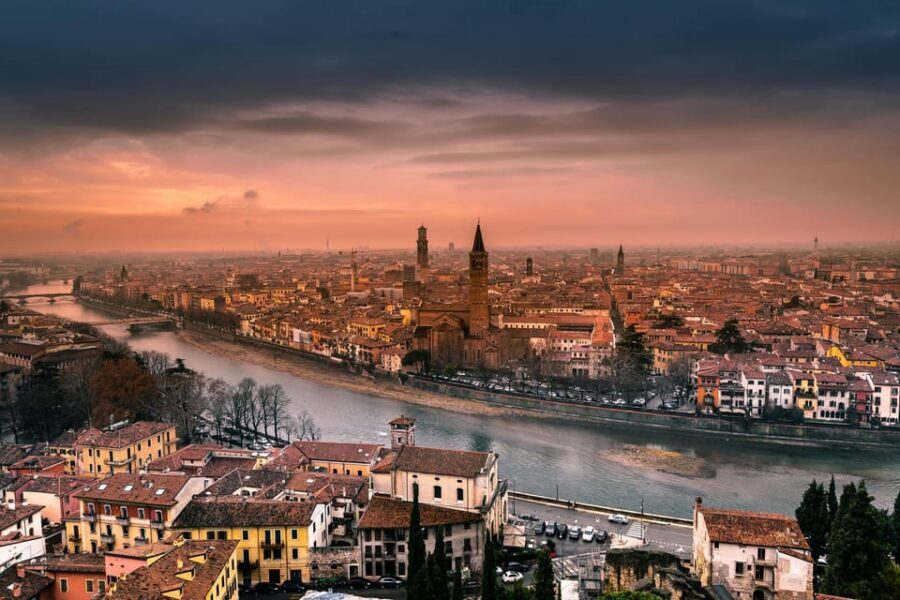
The map includes more than 50 selected locations, including iconic sights, cozy restaurants, and different activities. What matters for you is not the exact number, it’s that the selection is designed to cover a full range of interests so you can build days that feel balanced: one day heavy on walking and sights, another day calmer with food and smaller activities.
You can expect the experience to connect each stop to real-world planning help. The map’s details and tips are meant to help you move through the city confidently, not just click a pin and hope.
Because the product is self-guided, you get freedom. You can:
- Pick a route for the day, walk it, and adjust later.
- Change plans if the weather shifts or lines are too long.
- Use the map even if you’re traveling with family, friends, or solo, since everyone can choose their own pace within the same set of suggestions.
A quick reality check: since the itinerary is flexible, you won’t get a strict day-by-day schedule inside this review. Your best workflow is to decide your own number of stops per day. A good rule is fewer stops with more time to wander, especially in the historic center.
The sightseeing value: iconic stops plus choices that keep it human
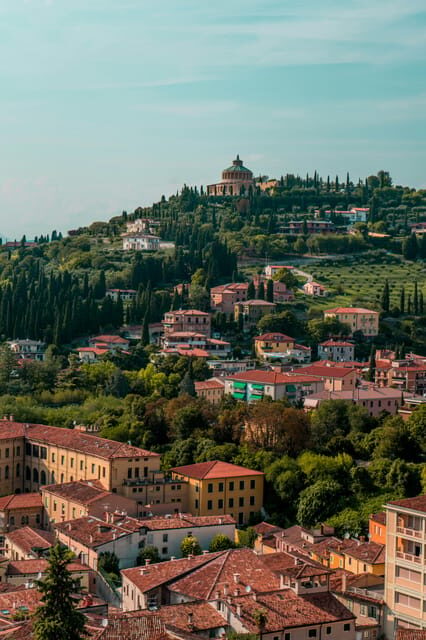
You’re not just getting a list of famous monuments. The map’s selection is described as mixing iconic sights with quieter experiences and restaurant recommendations. That’s the difference between visiting Verona and actually feeling like you’re in Verona.
In practical terms, it helps with two things:
- Confidence. When you know what a stop is and what it’s good for, you’re less likely to rush past it or end up somewhere you do not enjoy.
- Better pacing. If the map offers food and activities near the sights, you’re more likely to take breaks naturally.
And while the description does not name every location included, it clearly signals that the content connects you from emblematic places to lesser-known parts of the city. That’s exactly the kind of guidance that makes a self-guided trip feel purposeful instead of random.
Restaurant picks and meal planning without the midnight scramble
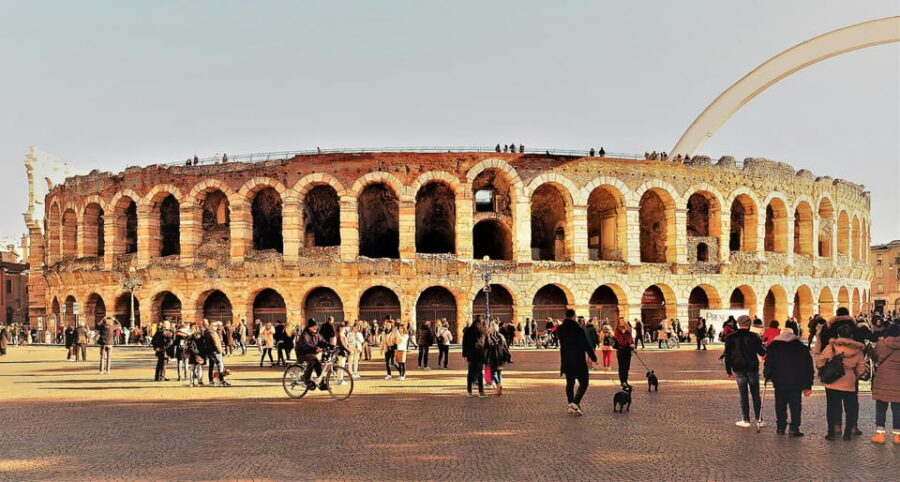
Verona is not only sight-heavy; it’s also a place where food is part of the joy. This map includes cozy restaurants in the selected list, and it also includes practical information and links for planning.
Even if you do not use every restaurant idea, the real value is that you start each meal decision from a shortlist, not from scratch at the end of a long day. That matters because Verona nights can turn into a decision fatigue contest if you’re hungry and tired.
My advice: use the restaurant suggestions as a default plan, then confirm details closer to your visit. If the map links to booking sites or reservation options, take advantage of them when available.
You can also read our reviews of more tours and experiences in Verona



Ticket and booking links: convenience with a warning label
One of the strongest features is that the map includes links to specific sites for ticket purchases and reservations, with partner companies and exclusive discounts.
This can save you time, but also keep you from making common mistakes, like buying from an unreliable reseller or choosing the wrong ticket type. When links are already selected, you spend less time checking if you’re on the right page.
Still, there’s an important consideration: the map notes that any questions about reservations and activities purchased should be handled by the supplier. So you should treat the map as your planning tool, not the customer service desk.
The app experience: why device access is the one thing to test first
The product includes a mobile app, and this is where you need to be a little cautious. Some people reported not being able to open or view the map correctly depending on phone type, and also reported that a contact number did not get a response.
So before you buy and certainly before you rely on it during your trip, do this simple test:
- Open the map link right away on your phone.
- Confirm you can see the pins/points and tap for information.
- If the app experience is critical for you, test it on the device you’ll actually travel with.
That’s not a nitpick. A self-guided trip depends on your tools. When the map is working, it’s great. When it’s not, you’re left scrambling.
No meeting point, but do not forget one key responsibility
Because this is an interactive map, there is no tour guide and no meeting point. That’s part of the appeal: you choose when to start, how long to stay, and how fast you walk.
But independence comes with responsibility: you still need to plan what requires advance action. The map itself tells you to remember to book what you need or buy tours and tickets in advance. So use the map’s linked options for anything time-sensitive, and then confirm your reservation details.
Also, double-check that you’re getting what you expect. One part of the provided description mistakenly references suggestions within Turin, not only Verona. That could be a simple copy error, but the smart move is to confirm the map you access is the Verona map you paid for.
Wheelchair accessible: what that means for your planning
The map is marked as wheelchair accessible. That’s useful, but it still means you should plan your routes with real-world walking conditions in mind.
Since the product is a map with points, the best approach is:
- Use the interactive pins to decide where you’ll go.
- Rely on Google Maps walking directions for accessibility-friendly routing.
- Leave extra time for any areas that may be slower to navigate.
The map can help you organize, but your on-the-ground route still matters.
Price and value: is $15 worth it for Verona?
At $15 per person for 30 days of access, the value depends on one thing: how much time and effort you’re currently willing to spend researching.
If you like planning but hate the late-night tab marathon, this tool is priced in the sweet spot. You’re basically paying for:
- A pre-selected set of 50+ stops
- Explanations and tips so you know what you’re looking at
- Links so you can book without hunting
If you’re the kind of traveler who already has a strong Verona plan and never needs restaurant or ticket suggestions, you may not get as much value. In that case, the map might feel like an extra step.
Also consider the low rating (1.6 based on 3 checks). The low score seems tied to access and response problems. That doesn’t automatically mean the map is bad, but it does mean you should treat device compatibility and access reliability as part of the decision.
A sample way to spread it over several days (without forcing a schedule)
Because the map is flexible, you can design a trip that matches your energy level. Here’s a practical structure you can apply:
Day 1: Orientation and major sights
Choose a compact route with a few emblematic stops, then use the nearby restaurant suggestions for lunch. End with one smaller activity so you don’t feel rushed.
Day 2: Deeper neighborhoods and slower pacing
Use the map to pick quieter activities and a restaurant that’s a bit of a detour from the busiest areas. Keep your list short, and allow time to wander between pins.
Day 3: Tickets and one planned activity
Pick anything you must book ahead (if the map links you to timed options). Keep the rest flexible around your bookings.
Even if your Verona trip is shorter, the logic works: concentrate stops, use the map’s tips, and let the city fill in the gaps.
Who this Verona self-guided map suits best
This product fits travelers who want structure without a guide.
It’s a strong match if you:
- Want a self-guided itinerary built from a curated list of stops
- Like the idea of using a map plus your phone for routing
- Value convenience for tickets and reservations via provided links
- Travel solo, with friends, or with family and need choices
It may be a weaker match if you:
- Rely on a specific phone setup and you cannot test access first
- Need fast support from a human if something breaks
- Want a fully scheduled tour with timed narration (this is not that)
Should you book it? My honest take
I think this can be a smart buy at $15, especially if you’ll use the map as your planning backbone for multiple days. The fact that it offers 50+ Verona stops, personalized tips, restaurant ideas, and direct ticket/reservation links is exactly the kind of practical value that saves time and reduces stress.
That said, I’d only book it if you’re comfortable doing one quick thing first: test access on your device before you arrive. Given the reported trouble opening the map on some setups and the lack of response when help was needed, you do not want to discover access problems after you’re already walking around Verona wondering why your pins disappeared.
If the map opens smoothly for you, it’s a good way to create a confident, independent Verona trip without paying for a guide.
FAQ
What is included with the Verona interactive map?
You get access to an interactive digital map with more than 50 selected locations, personalized tips and detailed information, plus links to suggested websites for reservations and ticket purchases.
Do I need a tour guide for this experience?
No. It’s a self-guided experience. The map helps you plan your route and what to do independently.
How long can I use the map after purchase?
You get 30 days of access.
How do I get access to the map?
After payment, you’ll receive an email with purchase confirmation and a link to access the digital map.
Is there a meeting point?
No. Since there’s no tour guide, there is no meeting point.
Are tickets or reservations included in the price?
No. Tickets, reservations, or other activities are not included. The map provides links to book or buy through partner sites.
What is the cancellation policy?
You can cancel up to 24 hours in advance for a full refund.
Is the map wheelchair accessible?
Yes. It’s listed as wheelchair accessible.